![Via-TRM Knowledge Base.png]](https://help.viatrm.com/hs-fs/hubfs/Via-TRM%20Knowledge%20Base.png?height=40&name=Via-TRM%20Knowledge%20Base.png)
Via has its own messaging system so that you can easily communicate with your organization's Administrators. It's easy to send a message and reply to messages. Your Administrator/s will receive the message in their email inbox. You will receive any replies in your email inbox. To reply, click Reply from your email. You will be taken to Sign In and directly to the Messages to send a response.
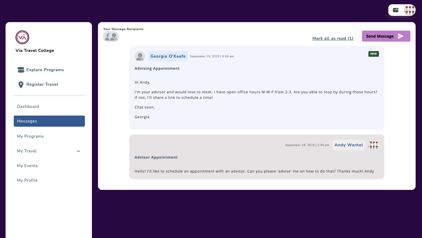
To send a message...
- Login to Via
- Click the View Messages quick action button or Messages in the navigation menu on the left side of your screen
- Click Send Message
- Type in a subject, message content, add an attachment if desired
- Click Send